

Many homeowners and small business owners want to view their CCTV camera feed directly on a TV without investing in a DVR. While DVRs are commonly used to record and manage footage, there are situations where you may simply want to monitor live video from a camera on a television screen.
The good news is that connecting certain CCTV cameras directly to a TV is possible. However, the method depends on the type of camera and the available input ports on your television. In this guide, we’ll explain the direct BNC-to-HDMI adapter method, when it works, and when it doesn’t.
If you’re planning to install a cctv camera in jaipur, understanding these connection options can help you choose the right equipment for your needs.
Can You Connect a CCTV Camera Directly to a TV?
Yes, but not all CCTV cameras can be connected directly to a television.
Traditional analog CCTV cameras typically use a BNC connector to transmit video signals. Modern televisions, however, generally support HDMI inputs instead of BNC inputs.
To bridge this gap, you’ll need a video converter or adapter that converts the camera’s video signal into a format the TV can display.
Understanding BNC and HDMI
Before connecting your camera, it’s important to understand these two connection types.
What Is BNC?
BNC (Bayonet Neill-Concelman) is a connector commonly found on analog CCTV cameras. It carries video signals from the camera to recording devices such as DVRs.
What Is HDMI?
HDMI (High-Definition Multimedia Interface) is the standard connection used by modern televisions, monitors, and media devices. It supports both audio and video transmission.
Since these two technologies use different signal formats, a simple cable alone is often not enough.
Method: Connecting CCTV Camera to TV Using a BNC-to-HDMI Converter
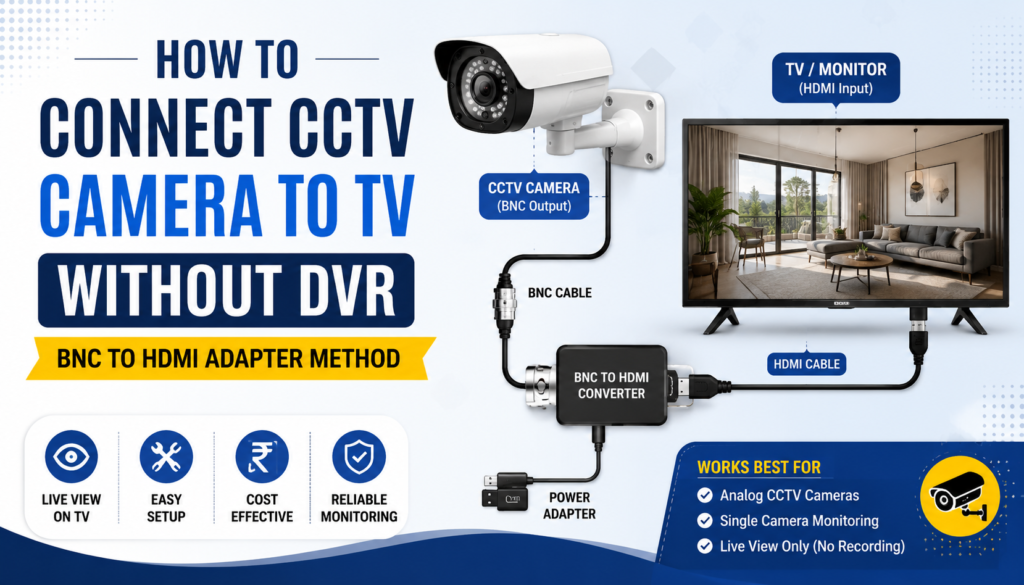
The most reliable way to connect an analog CCTV camera directly to a TV is by using a BNC-to-HDMI converter.
Equipment Required
You’ll need:
- CCTV camera with BNC video output
- Power supply for the camera
- BNC cable
- BNC-to-HDMI video converter
- HDMI cable
- Television with HDMI input
Connection Steps
Step 1: Power the CCTV Camera
Connect the camera to its required power adapter. Most CCTV cameras operate on 12V DC power.
Step 2: Connect the BNC Cable
Attach the BNC cable from the camera’s video output to the converter’s video input.
Step 3: Connect Converter to TV
Use an HDMI cable to connect the converter’s HDMI output to the television’s HDMI input.
Step 4: Power the Converter
Many BNC-to-HDMI converters require an external power source via USB or an adapter.
Step 5: Select HDMI Source
Turn on the television and select the corresponding HDMI input source.
If everything is connected properly, the live camera feed should appear on the TV screen.
When the BNC-to-HDMI Method Works
This setup works well in the following situations:
Analog CCTV Cameras
Traditional analog cameras that output standard video signals can usually be displayed using a converter.
Single Camera Monitoring
If you only want to view one camera feed live without recording footage, this method is ideal.
Small Shops and Homes
For small security setups where recording is not essential, direct viewing can be a simple and affordable solution.
Temporary Monitoring
Construction sites, warehouses, and temporary installations often use direct TV monitoring for quick surveillance.
When the BNC-to-HDMI Method Does Not Work
There are several situations where this setup may fail.
IP Cameras
Network-based IP cameras transmit digital data rather than analog video signals.
These cameras cannot typically connect directly to a TV through a BNC-to-HDMI converter because they require:
- Network connectivity
- Camera software
- NVR systems
- Mobile or desktop applications
Cameras Without Video Output
Some modern cameras only communicate through networks and do not provide direct video outputs.
Recording Requirements
A TV connection only displays live video.
Without a DVR or NVR, you cannot:
- Record footage
- Search past events
- Playback recordings
- Store video evidence
Multi-Camera Systems
If you need to display multiple camera feeds simultaneously, a DVR or NVR is usually required.
Alternative Method: Direct AV Input Connection
Older televisions often include AV (RCA) inputs.
In such cases, you may use:
- BNC-to-RCA adapter
- RCA cable
The camera’s video signal can be connected directly to the TV’s AV input.
However, many modern smart TVs no longer include RCA ports, making HDMI converters the more practical solution.
Advantages of Connecting CCTV Directly to a TV
Lower Cost
You avoid purchasing a DVR if recording is unnecessary.
Easy Setup
The installation process is straightforward and can be completed within minutes.
Real-Time Monitoring
Live footage appears instantly on the television.
Suitable for Basic Surveillance
Ideal for entrances, reception areas, garages, and small retail stores.
Limitations of Direct TV Connection
Despite its simplicity, direct connection has several drawbacks.
No Recording
You cannot save video footage for future review.
Limited Camera Support
Not all camera models support direct viewing.
No Remote Access
Unlike DVR or NVR systems, you cannot monitor cameras through a mobile app.
Reduced Security Features
Functions such as motion alerts, cloud storage, and analytics are unavailable.
Should You Use a DVR Instead?
For most residential and commercial security installations, a DVR remains the better long-term solution.
A DVR offers:
- Video recording
- Playback capabilities
- Motion detection
- Remote viewing
- Multi-camera management
- Evidence storage
If security is a priority, investing in a complete surveillance system provides significantly greater protection.
Final Thoughts
Connecting a CCTV camera directly to a TV without a DVR is possible in many cases, especially when using an analog camera and a BNC-to-HDMI converter. This method is useful for simple live monitoring where recording is not required.
However, it is important to understand its limitations. While direct TV viewing can be cost-effective, it lacks the advanced features and recording capabilities offered by DVR-based systems.
If you’re planning to install a cctv camera in jaipur, consult a professional to determine whether a direct-viewing setup or a complete DVR solution is best for your property. Before purchasing equipment, it’s also worth comparing the cctv camera cost in jaipur to find a system that meets both your security requirements and budget.